
Every consent,
recorded and signed.
eConsent records what the consumer saw and did on your web form or your call, then signs it into a certificate that a lead buyer, a carrier or your counsel can check for themselves.
$25 in credit to start. No card required.


- Channels
- Web forms, live calls and AI voice agents
- Evidence
- Signed certificate, session replay, audio hashes
- Retention
- Up to 7 years, your choice
- Install
- One script tag, or the API
Then it's signed, and anyone can check it.
On submit, eConsent issues a certificate signed with HMAC-SHA256 over the consent and disclosure data. The certificate link and QR code open a public page that recomputes the signature from the stored record. Change a signed field and it stops matching.

One record per lead, with the whole story in it.
The consumer's details, the exact disclosure on the page, the replay, the timestamps and the signature, kept together. Export it as a PDF or share it by link.

- Session replay The form as the consumer saw it: scrolls, clicks, field input and the disclosure on screen.
- Consent certificates A signed record per lead, shareable by link, QR code, PDF or API.
- Verification API Check consent and revocation state before a call or a lead purchase.
- Revocation Single, bulk, CSV and organization-wide opt-outs, kept next to the original consent.
- Inspector See which fields are captured, masked or ignored before a form goes live.
- Governance Audit log, role-based access and a retention period you choose, up to 7 years.
eConsent Voice
The consent layer AI voice agents are missing.
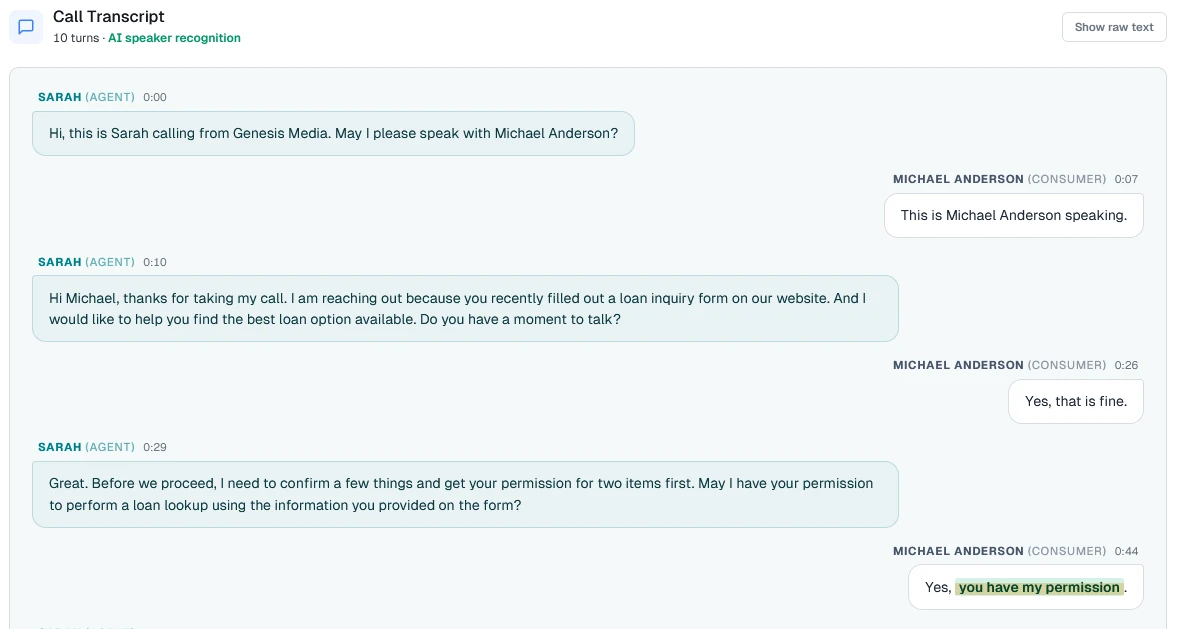
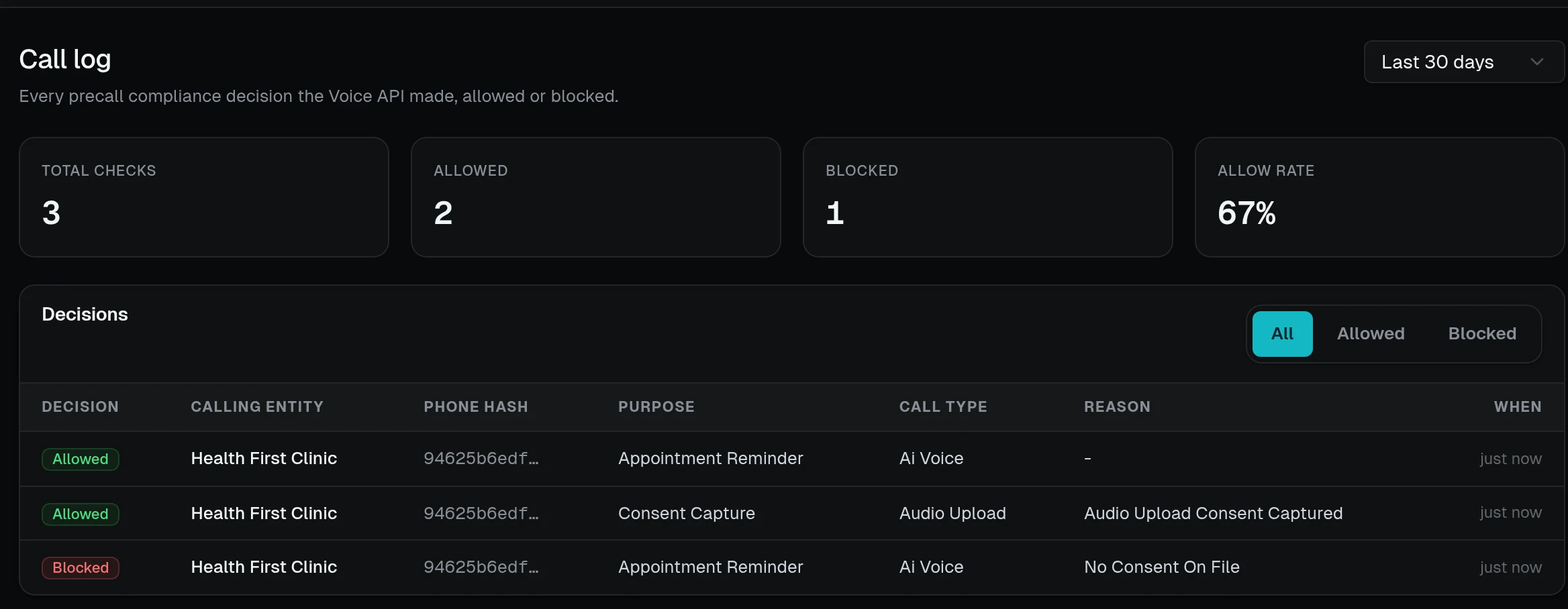
Call centers and AI voice agents check consent before dialing, capture verbal permission during the call, and attach the proof to a signed certificate. A web-form certificate says nothing about what was said on a call.
- Before the call A pre-call check returns allowed or blocked, with the reason, and the disclosures your rules call for.
- During the call Verbal consent is captured against the transcript and scored for affirmative consent and coercion.
- After the call Audio and transcript hashes go into a signed certificate, with revocations honoured on the next pre-call check.
Ask before you dial.
The Verification API tells you whether a certificate names your company in its disclosure, and when and where the consent was given. Whether that consent is enough for your campaign is for you and your counsel to decide.
Verification API referencecurl -X POST https://api.econsent.org/verify/partial-match \
-H "Authorization: Bearer $ECONSENT_API_TOKEN" \
-d '{"certificate_id": "14218923-bde1-432b-951e-a42a942ecb0e",
"company_id": "comp-northwind",
"term": "Northwind Auto Insurance"}'
{"valid": true,
"consent_opt_in": "2026-10-18T10:27:33Z",
"origin": "https://quotes.northwind-auto.example",
"verification_type": "third_party"}One lead, delivered to everyone who has to answer for it.
Captured on landing pages, lead forms, calls, AI voice agents and Meta Lead Ads. Here is the Northwind demo lead as each destination gets it.
POST https://crm.northwind-auto.example/hooks/econsentX-EConsent-Event: session.certificate.createdX-EConsent-Signature: 5b0e… (HMAC-SHA256 of timestamp.body) { "event": "session.certificate.created", "timestamp": "2026-10-18T10:27:33.912Z", "data": { "source": "session", "certificate_id": "14218923-bde1-432b-951e-a42a942ecb0e", "session_id": "14218923-bde1-432b-951e-a42a942ecb0e", "property_id": "6ad49ebfe77454ab23a85894" }}{ "allowed": true, "decision_id": "dec_…", "consent_source": "web_certificate", "upstream_web_consent": { "certificate_id": "14218923-bde1-432b-951e-a42a942ecb0e", "captured_at": "2026-10-18 10:27:33 UTC" }, "note": "Consent sourced from eConsent Web certificate. No direct Voice consent on file.", "compliance_notes": [ "Consent verified via upstream Web certificate." ]}// Seller: POST /certificate-sharing/certificates/:id/share{ "claim_token": "clm_9c41…", "expires_at": "2027-01-16T10:31:02.000Z" } // Buyer: POST /certificate-sharing/certificates/claim/clm_9c41…{ "claim_id": 1, "compliance": { "score": 100, "status": "pass", "matched": [{ "rule_name": "Names us as the caller", "phrase": "Northwind Auto Insurance", "type": "required" }], "missing": [] }}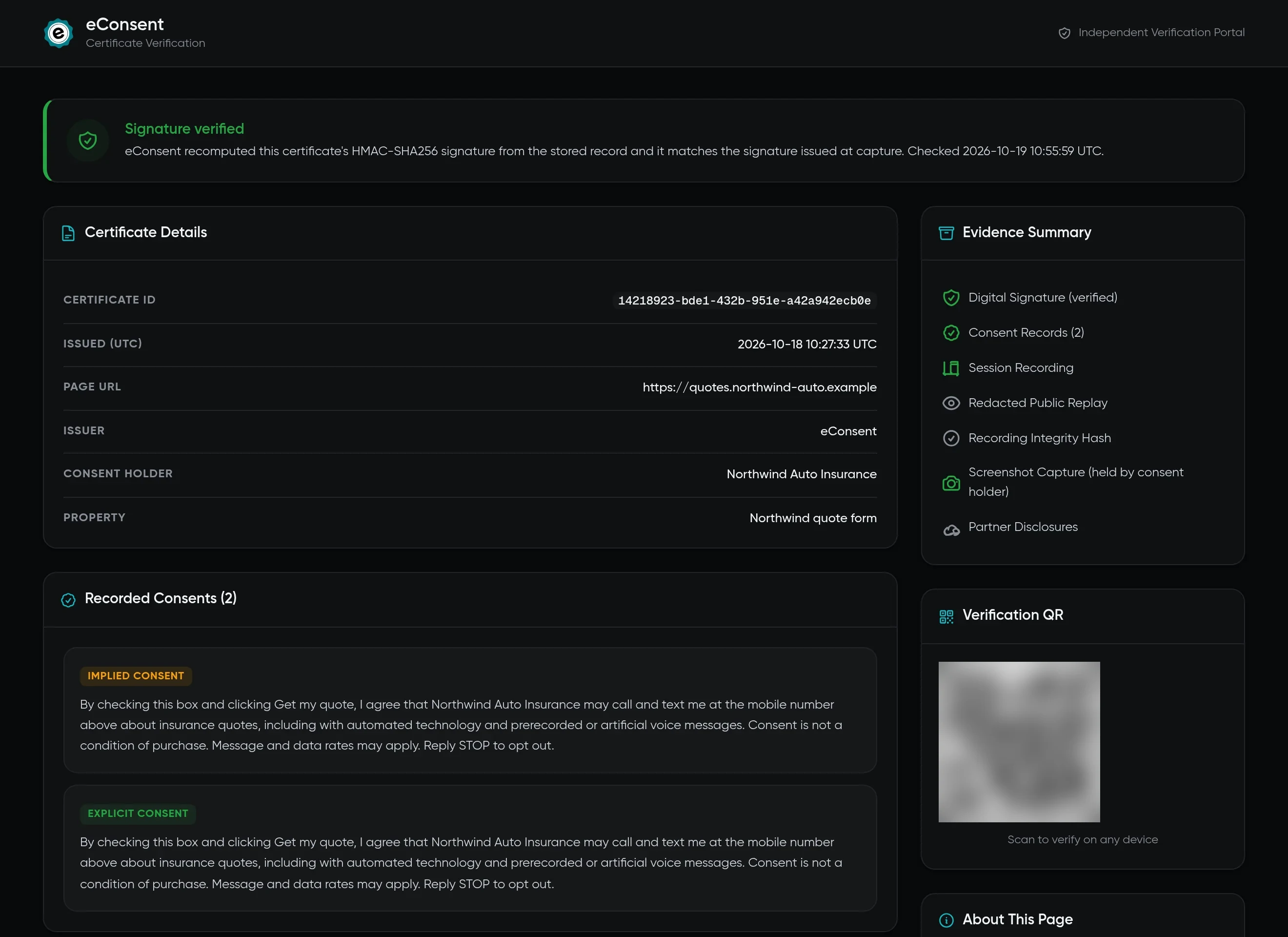
Example payloads for the demo lead, in the shape eConsent sends them. Signatures and generated IDs are shortened.
Which of these is you?
- I sell leadsPass each buyer a claim token with the lead. They claim the signed certificate into their own account.
- I buy leadsClaim the seller's certificate, check that its consent wording names you, and verify consent before anyone dials.
- I run call centers or AI voice agentsPre-call checks and verbal consent capture.
What could a gap in your records cost?
Under 47 U.S.C. § 227(b)(3), the TCPA sets statutory damages of $500 per violation, and a court can triple that to $1,500 if it finds the violation willful or knowing. A hypothetical, not a prediction or legal advice:
- Monthly outreach
- 50,000
- If 0.5% became claims
- 250
- At $500 each
- $125,000
$20 a month. 400 certificates included.
Every account starts with $25 in credit and no card. After the trial, eConsent Web is $20 a month with 400 certificates included, then 5¢ each. Voice and lookups are paid per event from the same wallet. Set a hard cap if you'd rather pause than spend more.
Full pricing Switching from another certificate provider
Enterprise
Volume pricing, a contract SLA, annual invoicing and dedicated support.
Book a walkthrough- Web Standarda month, 400 certificates included
- $20
- Each web certificate after 400paid from your wallet
- 5¢
- Verification API lookupper lookup
- 5¢
- Voice pre-call checkfirst 10 each month free
- 5¢
- Voice audio capturefirst 2 each month free
- 30¢
Questions before you install
How we sign, store and protect records is on the Trust page.
Does it work with my form builder?
If you can add a script tag to the page, yes. Install it directly in the page head or through Google Tag Manager. The tracker only runs on the domain you registered for the property.
What does the tracker capture?
Core contact fields, the consent elements you mark with data-consent-type, and any extra fields you choose in the Inspector. Everything else on the form is not captured. The Inspector shows what will be captured before a form goes live.
How long are records kept?
For the retention period you set on each property, up to 7 years.
Can a lead buyer or a court check a certificate without an account?
Yes. Every certificate has a public link and QR code. The page recomputes the HMAC-SHA256 signature from the stored record and shows whether it matches.
What does it cost?
Every account starts with $25 in credit and no credit card, which covers about 500 web certificates at 5¢. After that, eConsent Web is $20 a month with 400 certificates included, then 5¢ each. A Verification API lookup is 5¢, and Voice is paid per event from the same prepaid wallet. There are no seat fees.
Can I run it beside my current certificate provider?
Yes. Add the eConsent script to the same form, next to your existing tag, and compare the certificates for the same leads before you decide.
Add one script tag. Get a certificate on the next submission.
Or read the installation guide, including Google Tag Manager.
<script async type="module"
  src="https://d13jv0uulndum1.cloudfront.net/cdn/tracker.min.js"
  data-company="COMPANY_ID"
  data-property="PROPERTY_ID"></script>